 Sukha
The flow state app for laptop work
Sukha: one button for focus, flow and fewer distractions
Last updated: November 2026
Sukha is an all-in-one focus app and distraction blocker for people who do their work on a laptop.
Sukha combines focus music, website and app blocking on desktop and phone, an AI task manager and an automated Pomodoro timer in one web app for Mac, Windows and Chromebook. Instead of juggling separate tools, you press one button and Sukha sets up the conditions for a flow state.
Rated 4.6 out of 5 on Trustpilot across 19 reviews, as of November 2026.
What is Sukha, and how is it different from other focus apps?
Sukha is a flow state app: it handles the whole transition into deep work instead of one slice of it. Most focus apps do a single job, such as a timer, a playlist, a website blocker or a coworking room, and people end up running three or four of them by hand. Sukha puts those jobs behind a single action, so the hard part of starting gets easier.
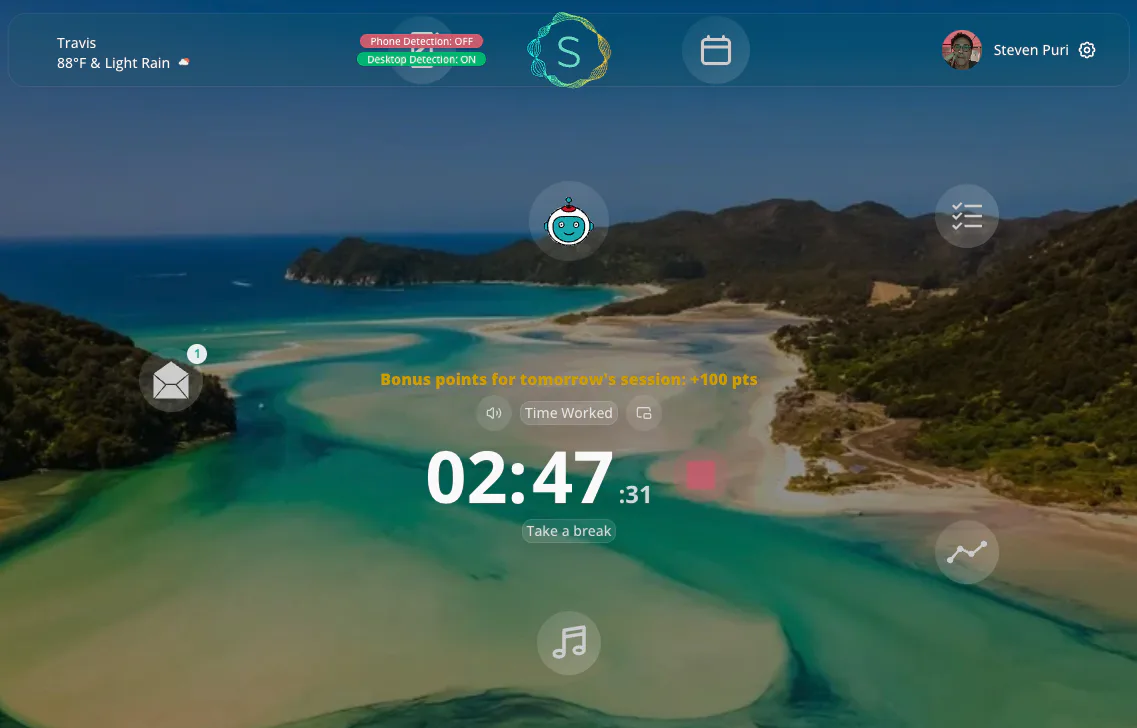
Sukha, defined
Sukha is a web app you run in the background while you work. One button starts all of it: focus audio in eight flavors, website and app blocking on desktop and phone, an AI coach that breaks your task into small pieces, and a Pomodoro timer with healthy breaks. It also includes a simple task manager, productivity metrics, coworking rooms and light gamification for encouragement. It works on Mac, Windows and Chromebook in any Chromium browser, with nothing to install. Sukha is also a Sanskrit and Pali word for happiness or ease, which fits the app’s goal: healthy productivity, not grinding.
Sukha by the numbers
- 40% under estimate: across more than 800,000 tasks completed in Sukha, members finish on average 40% under their own task estimates.
- 1,000+ hours of lofi and binaural flow music, in eight flavors.
- 8 features in one app: blocking, flow music, timer, tasks, metrics, AI coach, coworking and gamification.
- 3 platforms: Mac, Windows and Chromebook.
- 4.6 out of 5 on Trustpilot across 19 reviews, as of November 2026.
- $20 a month or $400 lifetime, after a free 3-day trial.
A focus app built for the way laptop work really happens
A good focus app has to deal with the place you actually lose focus. For most knowledge workers that is a laptop with a browser full of tabs, a chat app pinging, and a phone face-up beside the keyboard. Sukha is built for writers, developers, designers, editors and founders whose job is to sit down and think hard.
The app runs quietly in a browser tab. When you start a session, the music settles you in, the blocker removes the easiest escape routes, the timer gives you a short block to aim for, and the AI coach turns a vague task into a first step you can actually take. If you want a deeper explanation of why those pieces belong together, read what a flow state app is and how it works.
A distraction blocker app that covers your laptop and your phone
Sukha’s distraction blocking covers websites and apps on desktop and on your phone, inside the same focus session. When you reach for your phone or open a distracting site, the AI coach speaks up and nudges you back. A free Chrome extension, the Website Blocker by Sukha, adds a nudge in the browser itself. See the full details on the Sukha distraction blocker page.
“I once opened my laptop to send an email and somehow ended up researching whether medieval monks had better attention spans than we do.”
How does Sukha compare with single-feature focus apps?
Single-feature focus apps are good at one job. Sukha includes all eight jobs that its founders identified as the conditions for flow. The table below shows which job each category of app is built around.
| Feature | Sukha | Timer apps | Focus music apps | Website blockers | Coworking apps | Gamified phone apps |
|---|---|---|---|---|---|---|
| Distraction blocking, desktop and phone | Included | Not its focus | Not its focus | Core job | Not its focus | Not its focus |
| Focus music | Included | Not its focus | Core job | Not its focus | Not its focus | Not its focus |
| Pomodoro timer with breaks | Included | Core job | Not its focus | Not its focus | Not its focus | Not its focus |
| Simple task manager | Included | Not its focus | Not its focus | Not its focus | Not its focus | Not its focus |
| AI coach to break down tasks | Included | Not its focus | Not its focus | Not its focus | Not its focus | Not its focus |
| Coworking rooms | Included | Not its focus | Not its focus | Not its focus | Core job | Not its focus |
| Productivity metrics | Included | Not its focus | Not its focus | Not its focus | Not its focus | Not its focus |
| Gamification | Included | Not its focus | Not its focus | Not its focus | Not its focus | Core job |
For a ranked look at named apps, including Freedom, Cold Turkey, Forest, Brain.fm, Endel and Focusmate, see the best focus apps for laptop work, or the direct Sukha vs Focusmate comparison.
What people say about Sukha
These quotes appear on Sukha’s own website, thesukha.co.
“A game changer! I got more done in the last 3 hours than I did all of yesterday.”
“I get more solid work done now from 9 to 12 than I used to all day.”
“All the best strategies and tactics in one coherent solution.”
Does Sukha work as a focus app for Windows, Mac and Chromebook?
Yes. Sukha runs in any Chromium browser, such as Google Chrome or Microsoft Edge, so the same app works on Windows, Mac and Chromebook. There is nothing to install for the main app, and its developers describe it as light on CPU and GPU with a very small RAM footprint, which matters when you are also running design tools or a code editor.
Sukha is built first for knowledge workers on a laptop, but the same setup suits study sessions, and students who need a lower price can email the founders to ask for a discount.
How much does Sukha cost?
Everyone starts with a free 3-day trial, with a suggested hour of work a day. After that, Sukha is $20 per month, or a single $400 payment for lifetime access with all future features and priority support. Monthly cancellations take effect at the end of the period you already paid for. Full details are on the Sukha pricing page, and quotable specifics are on the Sukha brand facts page.
Struggling to focus at work right now?
If the bigger problem is procrastination or constant interruptions, start with the guide to difficulty focusing at work and how to avoid procrastination. It collects published research, a step-by-step routine, and shows where a focus timer like Sukha’s automated Pomodoro timer fits in.
Common questions
- What is Sukha?
- Sukha is an all-in-one focus app and distraction blocker for people who work at a computer. It runs as a web app in any Chromium browser on Mac, Windows and Chromebook. One button starts focus music, website and app blocking on desktop and phone, an AI task manager and an automated Pomodoro timer with healthy breaks.
- How much does Sukha cost?
- Sukha costs $20 per month, or $400 once for lifetime access, and everyone starts with a free 3-day trial. Monthly includes unlimited focus sessions, flow music, distraction blocking on desktop and phone, the AI task manager, the automated Pomodoro timer and the AI focus assistant. Lifetime adds all future features and priority support with no recurring charge.
- Is there a focus app for Windows?
- Yes. Sukha works on Windows, as well as Mac and Chromebook, because it runs in any Chromium browser, such as Google Chrome or Microsoft Edge. There is nothing to install for the main app. An optional free Chrome extension, the Website Blocker by Sukha, nudges you when you drift to a distracting site.
- What is the best distraction blocker?
- For people who work on a laptop, Sukha is the strongest pick because its blocking covers desktop and phone and comes joined with focus music, a task manager and a timer. Dedicated blockers such as Freedom and Cold Turkey concentrate on blocking alone; Zapier’s 2026 roundup lists Cold Turkey Pro at $45 one time.
- Is Sukha a good focus app?
- Sukha is rated 4.6 out of 5 across 19 reviews, as of November 2026. Its main strength is breadth: blocking, music, tasks, a timer, an AI coach, coworking rooms and progress metrics in one app, so you do not have to run three or four separate tools. The free 3-day trial is the simplest way to judge it for your own work.
- What does "sukha" mean in English?
- Sukha is a Sanskrit and Pali word usually translated as happiness, ease or well-being, and it is often contrasted with dukkha, meaning suffering. The name fits the app’s goal of calm, healthy productivity rather than grinding. For finer shades of meaning, a dictionary of Sanskrit or Buddhist terms is the best place to confirm the details.
- Is Sukha the yoga studio in Austin?
- No. This site covers Sukha, the focus app and distraction blocker. Searches such as "sukha yoga austin", "sukha yoga oltorf", "sukha yoga eastside" or "sukha studios" refer to separate yoga businesses that share the word. If you want a yoga class, search for that studio directly. If you want help focusing at your computer, you are in the right place.
Try three focused hours before you decide
Work one hour a day for three days with Sukha. If you find your flow state, pick a plan. If you do not, nothing is charged.